Full-version playful handwritten font for children's projects on Windows
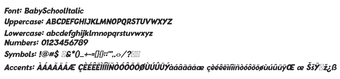
Baby School, from Sensatype Studio, is a playful handwritten display font designed to add childlike charm to educational and craft materials. It renders soft, rounded strokes for decorative and short display text, and ships as TrueType (.ttf) and OpenType (.otf) files for wide application support. The package contains roughly 197 glyphs with some accented characters and is optimized for legibility in creative headings. Graphic designers, educators, and parents can apply it to covers, classroom sheets, and social posts seeking a warm, informal tone.
What does Baby School supply to typographic projects?
The font provides a hand-drawn, child-focused voice that alters headline and display text with informal letterforms and soft, rounded strokes. Its decorative appearance suits educational materials, children's book covers, themed invitations, and craft prints. The family is presented as a display typeface, so it is intended to give short labels and titles a personalized, handwritten look rather than to serve as continuous reading text.
How extensive is its glyph coverage and file support?
The family includes about 197 characters, covering uppercase and lowercase letters, numerals, basic punctuation, and a set of accented characters for some international use. Files are available in both TrueType (.ttf) and OpenType (.otf) formats, which enables use across standard desktop design applications. The font is listed under "Fancy > Comic" to assist discovery in font libraries.
Is the font easy to install and use across systems?
Installation follows a standard font workflow on Windows: extract the ZIP, right-click the .ttf or .otf file and choose Install. The files also work on other systems that accept TTF/OTF fonts. Note that the version on common font portals carries a personal-use license; a separate commercial license is required from the developer for business projects.
Who gains the most from adding this style to their toolkit?
Designers, educators, parents, and DIY crafters benefit most when projects call for an approachable, playful heading style. Practical uses include classroom worksheets, greeting cards, and social media banners. The family’s popularity on font sites, with a high download count, signals frequent selection for informal designs. Projects that demand formal branding or extended language coverage may find the style limiting.
Baby School is a solid choice for short, playful headings
The font suits quick, craft-oriented graphics and educational art where a handwritten voice is useful; it is not intended for long-form reading or formal identity work. For best results, set modest line lengths, pair the font with a neutral sans or serif for body text, and confirm licensing for commercial use before publishing.